RMarkdown with GitHub pages
RMarkdown is an authoring framework for data science.
See the official documentation here and the RMarkdown cheat sheet
It supports output such as HTML, PDF, shiny applications, and MS Word.
Since it supports HTML, you can put the generated HTML files directly in a GitHub repository, and let GitHub Pages deploy and host your docs!
How it works
Install RMarkdown from CRAN (prerequisites are R and RStudio).
You write an Rmd file, which contains code chunks and markdown text.
---
title: "r_test_project"
author: "Sideshow Bob"
date: "2024-06-28"
output: html_document
---

```{r setup, include=FALSE}
knitr::opts_chunk$set(echo = TRUE)
```

## R Markdown

This is an R Markdown document. Markdown is a simple formatting syntax for authoring HTML, PDF, and MS Word documents. For more details on using R Markdown see <http://rmarkdown.rstudio.com>.

When you click the **Knit** button a document will be generated that includes both content as well as the output of any embedded R code chunks within the document. You can embed an R code chunk like this:

```{r cars}
summary(cars)
```

## Including Plots

You can also embed plots, for example:

```{r pressure, echo=TRUE}
plot(pressure)
```

Note that the `echo = FALSE` parameter was added to the code chunk to prevent printing of the R code that generated the plot.
Render it with knitr and set HTML format as output.
Create a GitHub repository, clone it, and store your Rmd and HTML file in the docs folder.
Set up GitHub pages.
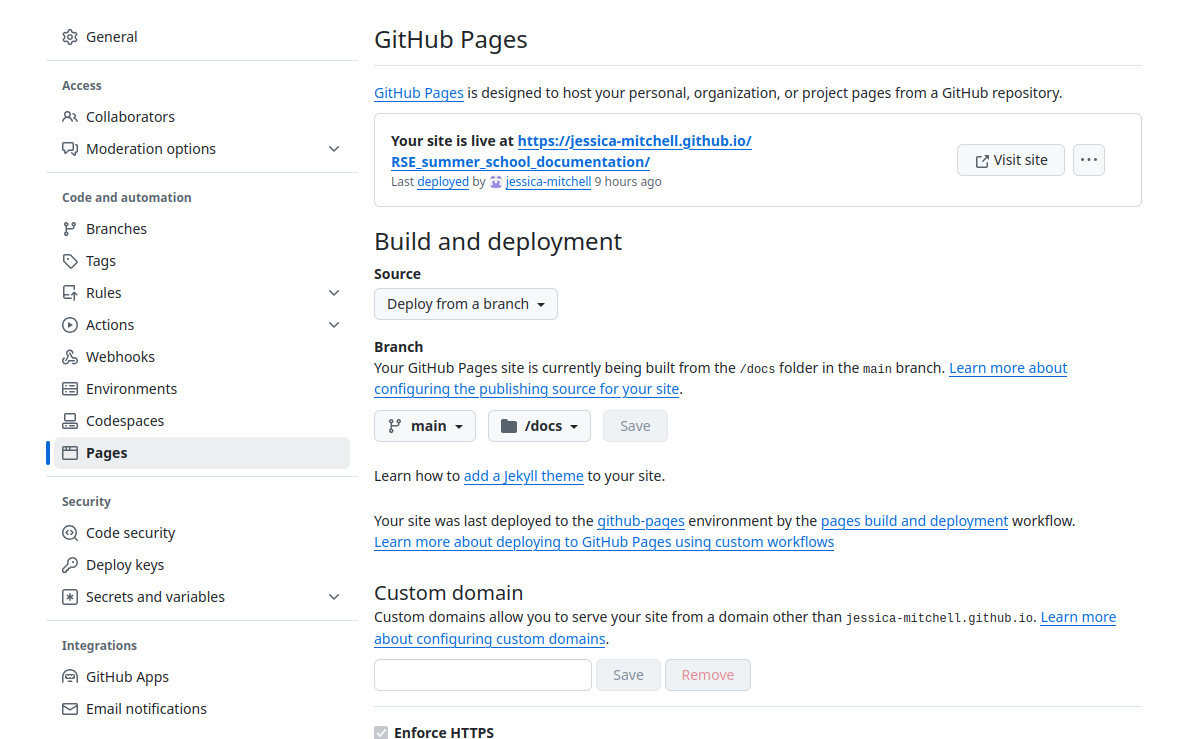
Under Settings go to Pages. Select a Source - in this case we will Deploy from a branch.
We then select branch main and docs as the folder we want to build from.
Push your HTML and Rmd files to your GitHub repo. (Make sure you have a file called index.html).
It might take a couple of minutes, but your site will be live at https://<your-username>.github.io/<project>
Output
The output looks like this: R sample project